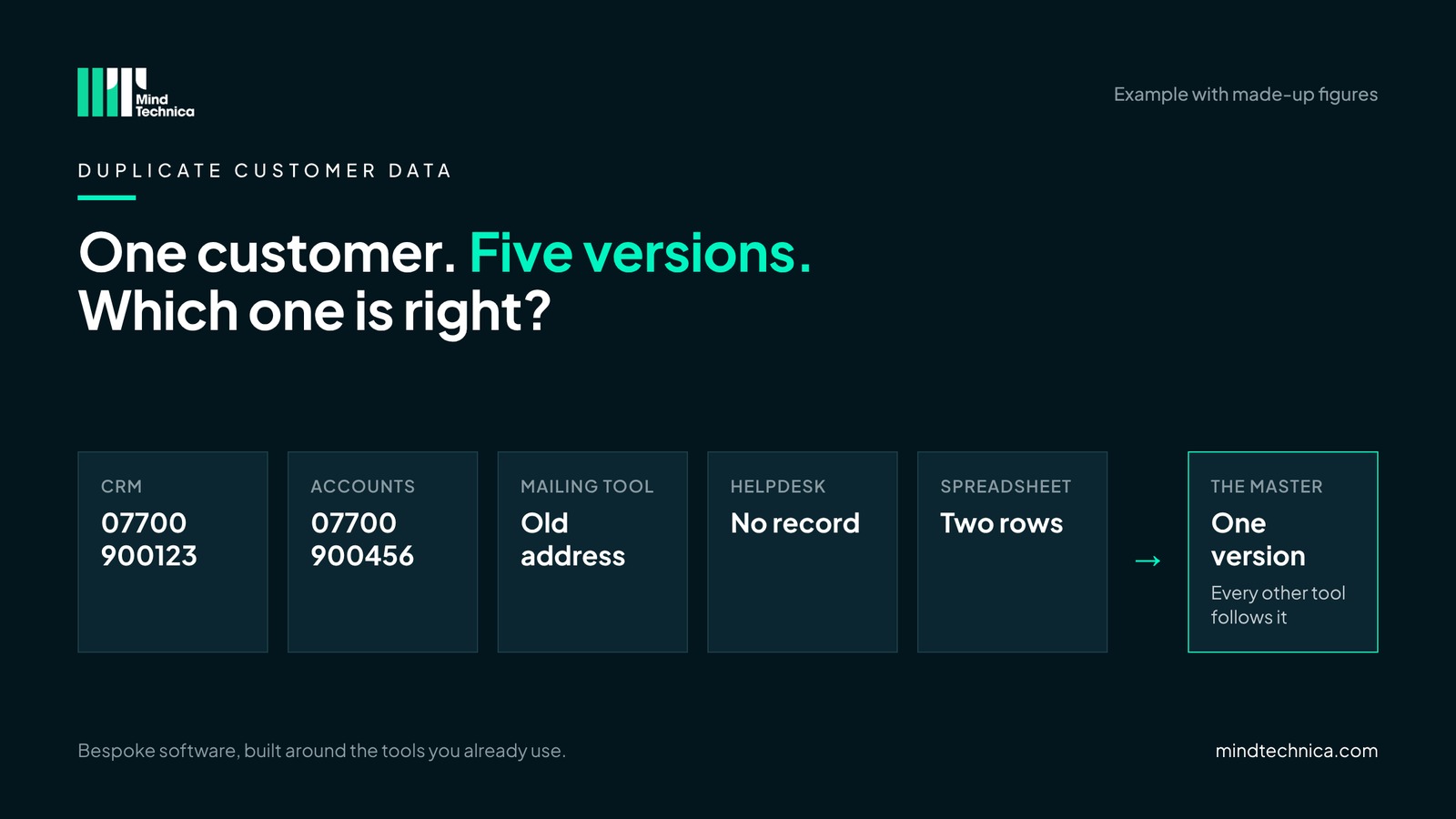
A customer rings to say their invoice went to the old address. The office checks the accounts system: new address, updated last month. The CRM still has the old one. So does the mailing tool. The helpdesk has no record of them at all, and the sales spreadsheet has them twice, spelt two ways.
Nobody did anything wrong. In a kitchen showroom or a growing services firm, it happens the same way: each tool keeps its own copy of the customer, and nothing tells the others when one copy changes. The more tools a business adds as it grows, the faster the copies drift apart.
Signs you have this problem
- Someone asks "which phone number is right?" more than once a week.
- A new customer's details are typed into more than one tool by hand.
- People keep their own spreadsheet "because the CRM isn't up to date".
- Someone unsubscribes and still gets an email from another tool.
- Two people have called the same customer about the same thing.
Two or more of these, and the same customer probably lives in several places in your business.
A worked example
Take a business of 30 people with five tools that hold customer details: a CRM, the accounts system, a mailing tool, a helpdesk and a shared spreadsheet. Pick ten customers who changed something in the last six months (an address, a phone number or a contact person) and compare them across two of those tools.
| What we compared | Result |
|---|---|
| Customers checked | 10 |
| Details that matched in both tools | 6 customers |
| Details that differed | 4 customers |
| Where the change had been made | In whichever tool the person had open |
Example with made-up figures. Your own ten-customer check takes about half an hour.
Four out of ten is not unusual. Each mismatch is a wrong invoice, a missed follow-up or an awkward phone call waiting to happen.
What it looks like in practice
In a kitchen, bathroom or bedroom showroom
The customer's details go into the design software at the first visit, the quote tool when they come back, the accounts when they pay the deposit, and the fitting diary when the job is booked. When they move house before the fit, someone updates the diary and forgets the accounts. The final invoice goes to the old address, and the fitter is nearly sent there too.
In a growing business with several tools
A new client is set up in the CRM by sales, in the project tool by delivery, in the accounts by finance and in the helpdesk the first time they ask for help. When their main contact leaves, the CRM is updated and the helpdesk keeps emailing someone who no longer works there. Nobody notices until the client mentions it, politely, in a review meeting.
Why it happens
Every tool that holds customer details needs updating when something changes, and in practice the change is made wherever the person happens to be working. The CRM gets the new phone number because sales took the call. The accounts system gets the new address because the invoice bounced. Each update is right. The trouble is that none of them travel.
It gets worse at handovers. Sales passes a new customer to delivery by email, and delivery types the details into their own tool. Support starts from scratch again. Every handover is another copy.
The fix: one master for each kind of information
The master is simply the one tool every other tool follows for a given kind of information. It doesn't have to be the same tool for everything. Contact details often belong in the CRM, payment terms in the accounts, opt-outs in the mailing tool. What matters is that everyone knows where the right version lives, and that changes are made there.
How to choose the master
- List every tool that holds customer details, including the quiet ones: a shared inbox, a WhatsApp group, the office spreadsheet. Most teams find one more than they expected.
- Split the details into kinds: contact details, order or job status, prices and terms, consent and opt-outs.
- For each kind, pick the tool where it is first created or most often changed. That is usually the right master, because it is where the truth arrives.
- Tell the team, write it on one page, and stop edits anywhere else for that kind of detail.
- Run the ten-customer check across two tools, fix every mismatch in the master, and keep the count. It is the number to beat next month.
Mistakes to avoid
- Buying a new tool to fix it. A sixth tool is one more copy, unless the others follow it.
- Choosing the master by who shouts loudest. Choose where the information first arrives.
- Trying to clean everything at once. Start with the customers who changed recently. Old records can wait.
Try this tomorrow
Take your last new customer and count how many tools their details were typed into, and by how many people. Write the number down. It is the most useful number in this whole exercise.
Get the full version, free
One Customer, Five Versions: nine checks you can do in about an hour with one person from each team, with "what good looks like" for each. Inside, for example: check 5, "Check that an unsubscribe reaches every tool"; check 7, "Agree how you spot a duplicate"; and check 9, what to do after an acquisition when two CRMs hold the same customers.
Ask for it through mindtechnica.com and we'll send it the same day. No sales call attached.
Questions people ask
Does the master have to be our CRM?
Not for everything. The CRM is often the right master for contact details, but invoices and payment terms usually belong in the accounts system, and opt-outs wherever people unsubscribe. One master per kind of information is the rule.
Do we need new software to do this?
No. Agreeing the master and the rule costs nothing and fixes a lot on its own. Connecting the other tools to the master, so they update themselves, is the step after that. And where no tool fits how you work, that one part can be built, bespoke, around the tools you keep.
How do we handle duplicates already in the system?
Agree how you spot one first (same email, or same company and postcode), then merge in the master only. Don't merge in several tools at once, or you'll create new mismatches.
Related reading
- Why your reports don't agree (it isn't a reporting problem)
- Two CRMs after an acquisition: the first 100 days
- What does typing it in again cost? A simple sum
Two CRMs after an acquisition: the first 100 days What does typing it in again cost? A simple sum
Want a second pair of eyes? Book a free 20-minute call at mindtechnica.com. We'll look at where your team types the most, and if a ready-made tool or the software you already have can do the job, we'll tell you.
Bespoke software, built around the tools you already use.